
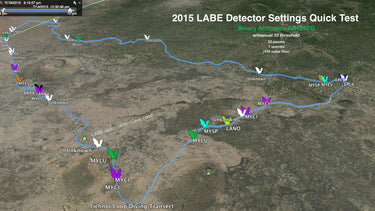


Transect - App for Visualizing Mobile Transect Data
 Transect - App for Visualizing Mobile Transect Data
$99.00
/
Transect - App for Visualizing Mobile Transect Data
$99.00
/

products.product.pickup_availability.unavailable
Your payment information is processed securely. We do not store credit card details nor have access to your credit card information.

Myotisoft Transect is a tool for visualizing acoustic transects using Google Earth. Simply grab a bat detector and a GPS unit, then drive, bike, or walk your transect route from start to finish. When you get home, Transect will allow you to view every bat call exactly where it was recorded!
Simply record your transect with a GPS unit (even your smart phone will work!); process your call sequence recordings to remove noise files and rename files as you identify species – SonoBat’s SonoBatch + SonoVet makes this easy. Then run the "Transecticizer" to view your calls – organized by species – exactly where they were recorded! Full spectrum recordings from Pettersson, Binary Acoustic Technology, and Wildlife Acoustics bat detectors are supported, as well as AnaBat ZeroCrossing files. Transect runs on Windows, Mac OS X, and Linux.
Why you need Transect
Transect came about when interest in bat acoustic transects exploded, yet there was no way to easily visually represent the data. BCM uses all popular brands of detectors available in North America, so we needed a utility that could work with all the different metadata formats in existance.
- Transect provids a way to visualize transects geospatially, and with temporal component;
- It allows multiple instances of the same transect to be compared geospatially to discover trends;
- It makes it EASY to analyze a single transect, and to analyze multiple routes over years;
- Most importantly, it prevents vendor / platform / toolset lock-in so we don’t lose valuable years of data;
- Transect allows managers to quickly provide staff and volunteers instant gratification for their work, keeping people engaged in long projects;
- Tried and tested at Bat Survey Solutions and Bat Conservation and Management workshops since 2012. It just works.
- Does NOT require detector with built in GPS capability.
- Unlike other transect visualizing solutions that simply use quite often erroneous auto classifier results to generate tracks, Transect is a real solution intended to be be run at the -end- of your workflow so that absolutely no noise files or undesirable misclassified bats are included in your data.
Requirements and Download Transect
To view your bat call locations on Google Earth or a GIS program, you don't need to have a bat detector with a built-in GPS. Your project personnel don't even need the same brand of detector. Before going off half-cocked though, consider that Transect is really at the end of your data post processing workflow and do this homework first:
- Record with any detector generating a timestamp (luckily this is any modern full spectrum device from Pettersson, Binary Acoustic Technologies, BatBox Griffin, Wildlife Acoustics, legacy device data processed using the SonoBat Batch Attributer, and also Anabat files).
- Simultaneously record a GPX track log file using a modern GPS (even a smartphone app does this.
- Optionally (though rather strongly suggested for the prettiest Transect eye candy) remove all noise files, properly attribute your files with rich metadata, and manually verify species classifications and resulting filename extensions.
Once you've got your folder of bat calls the way you like them (post processed, etc.) and the GPX track file is handy, then it is time to unleash Transect on them both. Even a very large dataset will only take a few seconds to produce a Google Earth KML file.
Available In Stock, Instant Download
Questions & Answers
Have a Question?
-
How to use BatRecorder files? There is no separate file with GPS locations. The GPS locations are saved in the WAV file in GUANO metadata.
The Transect app supports detectors with built in GPS such as Batrecorder. TransectPro actually does not because it cannot calculate abundance of indices without the GPX track log. Please be sure you are using regular Transect with the Batrecorder data. Batrecorder actually does have a function to export a GPX file, so see that in its settings especially if you are using regular Transect and cannot get data to work (do not select a GPX file). There are a few reasons to use the GPX track log; without it you cannot see where bats were -not- recorded, nor can you calculate stats like "bats per mile'. And of course, this should be your last step in post processing to make sure there are no noise files creeping into your maps. -JC
-
what is the difference between the standard and the pro version of the software?
Hello- Transect Pro exports .shp files for ArcGIS. Regular Transect exports Google KML files. Thanks!
-
Hi! Are Myotisoft Transect and Transect Pro licenses able to be used on multiple computers? For example, I work on 3 different computers depending on where I am (accessing info via USB stick or the cloud). Would I be able to have Myotisoft on all 3 of my computers, or would I need 3 different licenses? Thank you!
Hello Carter - Similar to SonoBat, the policy is to install on as many computers are you like, per user. We understand acoustic monitoring often uses multiple computers per user. If you have multiple users in your lab/office, for example, in that spirit they should have their own copies. Thanks!
-
I successfully created the KML file from my data, but all the points are showing as 'UNKNOWN' on the GoogleEarth file. Do I have to go through and manually label species? Or did I miss a step?
Transect first looks for a manual ID in the GUANO metadata, then manual ID in the species code appended to the filename. If neither are present, it uses the AutoID in GUANO metadata. If that's not present, it loos for manual ID in the appended filename. If it can't find any of that, then you get "unknown".
-Running your data thru SonoBat will append the autoID in GUANO
-Running your data thru Kapro will also append auto ID in GUANO, but you need to select ".wav" as your output, and use those new files with Transect. Using the original .wav files will result in Unknowns.
Manual ID in either kapro or sonobat should result in bat labels in Transect.
-
Is there a manual that explains how to run the animation on Google Earth? I am having problems running the animation slowly with the bat icons popping up.
Hi- for help with Google Earth issues, please see the Google Earth help community. First be sure your transect is the only thing that is turned on; all other layers are off. On the animation sliders, spread out the start and stop sliders. The "wrench" icon has a few settings, one that controls the speed of the animation. IMHO "slow" is not quite slow enough but I don't know of any way to slow it down more other than asking Google for a feature request. -JC