


Apodemus Bat Counter
 Apodemus Bat Counter
$2,849.00
/
Apodemus Bat Counter
$2,849.00
/

products.product.pickup_availability.unavailable
Your payment information is processed securely. We do not store credit card details nor have access to your credit card information.

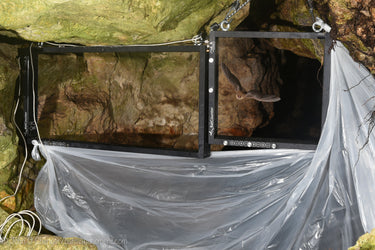
The BatCounter is an electronic device developed to use in field applications for counting bats, birds or other small animals passing through its rectangular or square shaped aluminium frame.
The aluminium frame of the BatCounter has had a black anodized surface treatment that protects the BatCounter in the outdoor making it a rugged and reliable partner.
When using the BatCounter for less than two days, you can rely on electrical power via the 8 AA batteries that are in the box. To enable longer runs, hook the BatCounter up to an external battery of 12V using the external power cable that is included.
The BatCounter detects and counts the different passings of bats and stores all the information on the SD Card. Not only will the collected data be available on the SD Card, external communication of this data is possible. Reports stating results and default information can be send by email and or SMS text messages at set intervals. This additional feature will provide you with results without the need to be physically present at the site and it will give the reassurance that the system is operating smoothly on a constant basis.
Simultaneously with detecting bats passing through its frame, the BatCounter is able to trigger your DSLR camera (Nikon or Canon) using an external cable or through infrared signal.
What’s in the box
1 Apodemus BatCounter
1 Carrying strap
1 12V power cable
1 Antenna
8 AA batteries
1 SD Card
4 M6 eye bolts
Technical specifications
- Detection Technique: 32 modulated infrared barrier beams detecting direction
- Minimum detection size: ≥ 25 mm
- Frame Size/Weight: 80 x 39 x 7 cm, 2800 g (Standard model)
- Active detection area: 76 x 35 cm (Standard model)
- Frame Size/Weight: 40 x 39 x 7 cm, 2200 g (Tree model)
- Active detection area: 36 x 35 cm (Tree model)
- Mounting: 4x M6 eye bolts are supplied to suspend the BatCounter
- 8x M6 female threads are foreseen for custom mounting
- Power supply: 8x AA batteries or external 12V (10..16V)
- Power Consumption: ≤ 40 mA under normal use. (Approx. 3 days on fresh .Varta “High Energy” AA batteries)
- Memory: SD Card, FAT16 or FAT32, up to 32 GB
- Configuration: Configuration via file on SD card
- Field software updates: Via SD Card update files.
- File formats: CSV or TXT
- User interface: User interface shows system status. The user interface is protected by a removable aluminium cover
- Mobile phone functionalities: Warnings: SMS / email
- Daily totals: SMS / email
- Daily reports: email
- An IP67 mobile phone antenna with SMA connector, SIM card and network coverage are required to use this feature
- Clock: Internal real-time clock
- Clock Accuracy: }3 min/year (0°C .. +50°C)}6 min/year (-10°C .. +60°C)
- Clock backup time: More than one year after a full operational period of 24 hours or more (internal clock battery recharge time)
- Camera trigger: For Nikon and Canon wired with 2.5mm jack and infrared is advised for reliability and speed.
- Other brands on request.
Available, max shipping 30 days
Questions & Answers
Have a Question?
-
Is it possible to dismantle the metal frame with the aim of carry it more easily in the field, or is it too risky for the system ?
The frame is not collapsable. We do not advise taking the frame apart, as will void the warranty.
-
Is the bat counter able to differentiate between entering and exiting the crevice/cavity or does it count all passes through the frame? This product sounds extremely useful. Thank you.
Hello- the Bat Counter has 2 banks of beams, so in theroy is can detect the direction of an object. In the spreadsheet report it generates, it is listed as IN or OUT in columns you can tally.
-
Hello, I have a couple of questions How do I set the time on a BatCounter (I am in the UK, the log tells me its 12:26 when its 11:20 What do the headings in the log file mean (eg Actin, Actout) etc Thank you
First please download and install the latest firmware from the Apodemus website.
The BatCounter counts 4 different events; in-flying, out-flying and activity in, and activity out. Where the in-flying and out-flying events are clear in their meaning; the activity is a case where no valid passage is detected, eg: a bat passes one side of the light beams but does not pass the other set of beams. This is marked activity on the inside or activity on the outside.
All events are added and this is called Tot. (Activity isn't always logged. You have to set this in the config file: log_activity 1).
Setting the system time can be done via the batcounterconfig.txt file on the SD card. The command is executed when the BatCounter boots.
When you are done setting the time it is advised to remove the line from the batcounterconfig.txt file, otherwise it will be executed at every boot. The BatCounter does not automatically adjust for daylightsavingtime, as this will create strange, unintended effects in the log files.
The command you have to use is built up like this:
set_clock "17-09-06 14:25"
Please keep in mind:
set_clock
followed by a TAB
then the date within double quotes. Order: "YY-MM-DD HH:MM"YY = 2 digits year
MM = 2 digits month
DD = 2 digits day of month followed by a SPACE
HH = 2 digits hour
MM = 2 digits minutes
(So no seconds)For other information please consult the BatCounter Manual or contact Apodemus.